
How to Scrape Trip.com & Ctrip (携程) Hotel Reviews (2026 Guide)
Trip.com and Ctrip (携程) hold one of the largest pools of hotel guest feedback in the world, and most of it is invisible to Western analytics tools. This guide covers what you can extract, why these two sources are trickier than they look, and the fastest way to get clean, structured review data from both.
Why scrape Trip.com & Ctrip reviews?
For hotels, OTAs, and hospitality analysts, this is some of the highest-value review data available:
- Reputation monitoring: track guest sentiment for your properties across the Chinese and global traveller base.
- Competitor benchmarking: compare sub-ratings (cleanliness, service, location) against rival hotels at scale.
- Chinese-market intelligence: Ctrip (携程) is the dominant platform for mainland-China travellers; its reviews are a window most Western tools never see.
- Guest-experience & AI: feed structured, LLM-ready review text into sentiment analysis or a RAG pipeline.
The catch: Trip.com and Ctrip are two different datasets
Trip.com (the global brand) and Ctrip (携程, the mainland-China platform) share ownership but expose different reviews, different travellers, and different content. Most scrapers handle one or the other. To get the full picture of a hotel you need both, the international guests on Trip.com and the domestic Chinese guests on Ctrip. Pulling them separately means stitching two inconsistent datasets together by hand.
What data can you get?
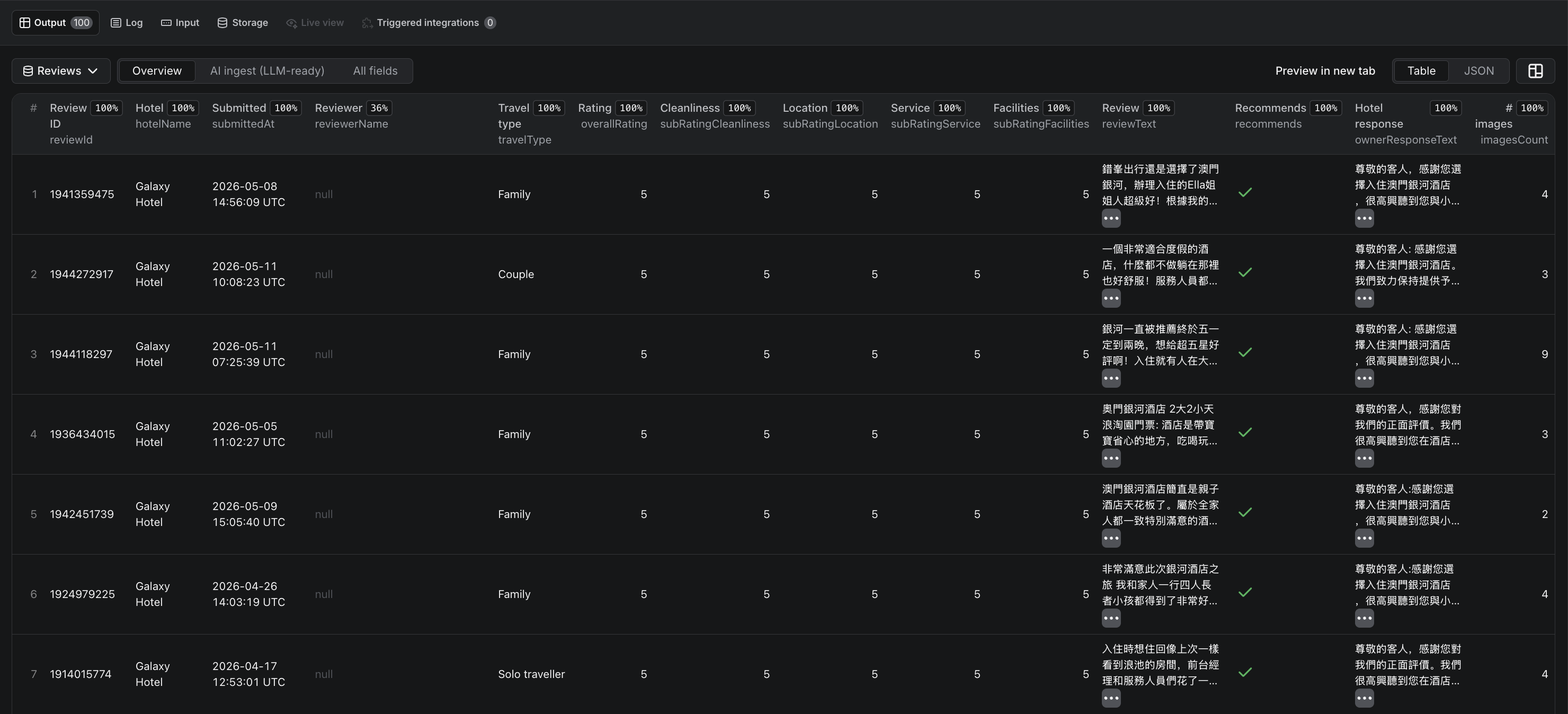
A complete extraction returns up to 32 fields per review and 21 per hotel, including:
- Overall rating plus granular sub-ratings: cleanliness, location, service, facilities
- Owner / hotel responses: separated from the review body
- Reviewer origin (where the traveller is from)
- Travel type: couple, family, business, or solo
- Review date, room type, and trip context
- An LLM-ready markdown rendering of the full review for AI pipelines

Why building your own breaks
- Anti-bot protection on both sites blocks naive requests quickly.
- Two separate sources with different layouts and review structures to parse and reconcile.
- Bilingual content: Chinese and English reviews mixed together, needing consistent structured output.
- Pagination & scale across hundreds of reviews per hotel, with retries and rate limits.
The fast way: the FactDen Trip.com & Ctrip Reviews Scraper
The FactDen Trip.com & Ctrip Reviews Scraper on the Apify platform pulls both datasets in one run, with no login, no cookies, and no API key.
Step 1: Open the actor
Go to the Trip.com & Ctrip Reviews Scraper on Apify and click Try for free (a free Apify account is all you need).
Step 2: Give it a hotel
Paste one or more hotel URLs, or provide a search term, and set how many reviews per hotel you want plus any filters.
Step 3: Run it
The actor handles anti-bot, pagination, and both sources, writing clean structured rows to a dataset as it goes.
Step 4: Export
Download as JSON, CSV, Excel, or HTML, or pull via the Apify API. Each row is a fully structured review; a per-hotel summary rolls up the ratings.
★★★★★ “Ctrip review data was consistent. AI markups are interesting as well.” · Verified user, Apify Store
What does it cost?
Pricing is $4 per 1,000 reviews, pay-per-result, dropping to $2.50 per 1,000 on the Business tier. You pay only for the reviews you extract, and there's a free tier to test first.
Frequently asked questions
- Does it scrape both Trip.com and Ctrip?
- Yes, both in a single run. Trip.com's global reviews and Ctrip's (携程) mainland-China dataset, instead of just one.
- How much does it cost?
- $4 per 1,000 reviews, dropping to $2.50 per 1,000 on the Business tier.
- Do I need a login or API key?
- No. No login, no cookies, no API key.
- Can I export to CSV or Excel?
- Yes, JSON, CSV, Excel, or HTML, or via the Apify API.
- What fields do I get?
- Up to 32 per review and 21 per hotel, sub-ratings, owner responses, reviewer origin, travel type, and LLM-ready markdown.
Try the Trip.com & Ctrip Reviews Scraper
Also see: How to scrape G2 reviews →